Hi,
I’m trying to run the same workflow in parallel, for example 3 instances of Workflow X running at the same time, each processing items from the same WorkItemQueue.
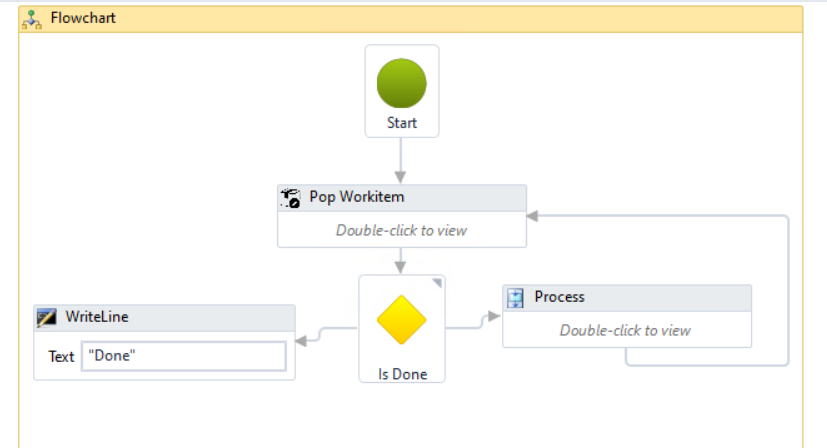
My workflow structure is simple:
When I launch 3 instances in parallel, they successfully process different queue items concurrently — exactly what I want.
During my search I found a recommendation from Allan Zimmermann, saying(Link):
“If you want to run multiple workflows remotely on a robot, you can mark one workflow as a background workflow or set remote_allow_multiple_running and remote_allow_multiple_running_max in settings.json.
But this is not recommended. If you need to run multiple workflows at the same time, you should look into using WorkItem Queues.”
What confuses me is the following:
1. Why is using background workflows or remote_allow_multiple_running not recommended?
Technically it works — multiple instances run in parallel and each robot picks different queue items.
So what problems can occur with these approaches?
2. What is the exact difference between background workflows and remote_allow_multiple_running?
Both seem to allow more than one workflow to run at the same time.
Which limitations or risks apply to each one?
3. How does “just use WorkItem Queues” solve the problem?
I am already using a WorkItem Queue.
But using a queue alone doesn’t automatically create parallelism — it only provides concurrency-safe item distribution.
I still need multiple workflow instances to process those items in parallel.
So how does Allan’s recommendation apply in a scenario where I specifically want “multiple parallel workers” for the same workflow?
4. What is the recommended approach for my use case?
I want something like 3 or 5 concurrent workers reading from the same queue.
What is the best practice for this in OpenRPA?
Any clarification about these concepts would be greatly appreciated.
Thanks!
Sorry for keeping this short.
The reason it’s not recommended to allow more than one workflow run is that OpenRPA is meant for UI automation. Two workflows cannot work with the UI at the same time, so if you want parallelism, you are supposed to install multiple robots on different desktops. However, if a workflow does NOT do UI automation, you can mark it as a “background” workflow, and this will make OpenRPA ignore the workflow when counting the number of running workflows.
If what you are doing is not UI automation, it might have been better to use an agent. But if you have already found a solution that works, I see no reason to change anything; I’m just pointing out that I would have started with an agent. 
Workitem Queues are HOW to allow parallelism between multiple robots (or agents or NodeRED workflows) in a secure way. It’s also a very convenient way of keeping state for multiple items and handling retry logic.
- Was answered above.
- Marking a workflow as background will make OpenRPA not “count” it as running, even when it is. So when OpenCore asks it to run a workflow and it counts the number of workflows, it will not see it and allow the request to go through. Using remote_allow_multiple_running makes it possible to run ANY workflow more than once. This is BAD unless you know every single workflow is not doing UI automation.
- Many people do not START with using workitem queues, so step one is to adopt using workitem queues and THEN install more robots. It’s part of the solution. And as already pointed out, you are not supposed to run multiple workflows that do UI automation on the same robot. And if you are not doing UI automation, you are supposed to use agents or NodeRED.
- If what you did works for you, keep it. But if you have the time and energy to rework it, then do one of the suggested things. Either install HD robots on a terminal server and run multiple OpenRPA robots on that, or look into using agents and real code instead.
Thanks for your reply Allan! I used HD robot on my gui based workflow as you said. As you know HD robots needs rdp session and each new rdp session is paid. For this reason I tried parallel execution for not gui based workflow without hdrobots. I will try agents for this case.