OpenRPA version:1.4.57.13
OpenFlow version:1.5.9
Using app.openiap.io or self hosted openflow: self hosted
Error message: We have multiple OpenRPA workflows that rely on embedded Python scripts. Earlier, we were using embedded Python 3.7 and everything was working perfectly. However, we had to upgrade to embedded Python 3.11 because some required libraries no longer support Python 3.7.
After upgrading to embedded Python 3.11, we noticed that whenever OpenRPA executes an embedded Python script, it becomes unresponsive and eventually gets stuck.
To resolve this, we decided to downgrade back to embedded Python 3.7. But after uninstalling embedded Python 3.11, we are now unable to install either embedded Python 3.7 or embedded Python 3.11. If we disable the scripting feature, OpenRPA launches successfully. However, once we enable scripting again after installation, OpenRPA fails to open at all. I have tried to install older versions of OpenRPA as well
Screenshot or video:
Attach a simple workflow from OpenRPA or NodeRED that reproduces the error/issue:
so you compiled OpenRPA your self ? or download different versions of OpenRPa i compiled from github ?
What do you mean “But after uninstalling embedded Python 3.11, we are now unable to install either embedded Python 3.7 or embedded Python 3.11.” is that inside Visual Studio or did you try to do that using the package manager inside OpenRPA ?
I am using version you have provided on github. What I meant is: OpenRPA has two separate installers one bundled with embedded Python 3.7 and another bundled with embedded Python 3.11.
After uninstalling the OpenRPA version that included embedded Python 3.11, I tried installing both versions again (the one with embedded Python 3.7 and the one with embedded Python 3.11).
But neither of those OpenRPA is opening up after installation.
If scripting is disabled, OpenRPA opens, but when scripting is enabled, OpenRPA does not open at all.
ok, then you did it correctly.
That is odd. The only time i have experience python giving issues is when you disabled the embedded python in OpenRPA
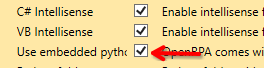
then it will use the python install in your path, and if that is different from the version OpenRPA expects it will crash.
Please open settings.json and check you have "Script_use_embedded_python": true if this is false, change it to true and try again
I have just uploaded screen Recording of the installation and Windows event logs as you can see I have downloaded OpenRPA from Github. after that I am installing OpenRPA with python 3.7 version. and in setting file scripting is enabled . however after installing if scripting module is installed than OpenRPA is not working however if scripting is removed or not installed it works fine
ScreenRecording: ScreenRecorderProject1.mkv
Windows Logs:windows logs.evtx
Hi @Allan_Zimmermann Can you please help me out over here as our all bots are using python scripts and those are stuck due to this issue . Kindly let me know if you need anything we can connect on call and I can give you access to my system as well if required.
Please let me know if you need anything from my side.
@Allan_Zimmermann
My work and personal life has to take priority over offering free support on discourse. I check the forum daily and answer most questions as good as I can.
The last few months I’ve been fighting like crazy to save the company.
But check your PATH, and make sure there is no python or python3 ( open a CMD and type whereis python .. if it finds one, remove it from path .. also make sure to remove PYTHON_HOME ) and then launch openrpa once there is more reference to your locally installed python
Hi @Allan_Zimmermann Thank you for the support and Apologies for annoying you.
I have formatted whole system to make sure there is no trace of installed python. after formatting and reinstalling windows 10 Pro . I tried to install OpenRPA with python 3.7 ,after installation it was still not opening up.
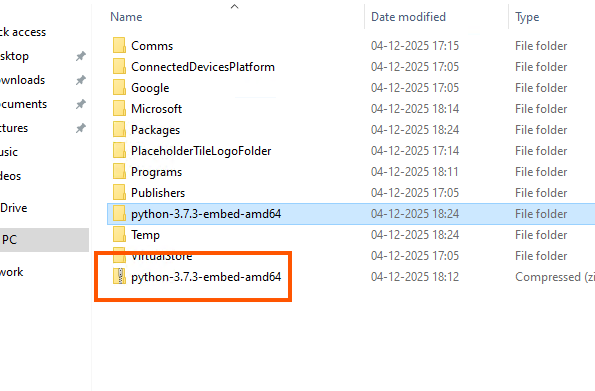
After doing some more digging I notice that when OpenRPA starts if Embedded python folder is not there OpenRPA tries to Extract the Embedded python from zip file as per snippet however was not able to extract all files from zip file it stops after extracting few files due this its fails to open up( may be some bug).
After manually Extracting Zip file OpenRPA is opening up.
I’m not sure i would ever have found that.
Nice job, and very good catch.