OpenRPA version: 1.4.57
OpenFlow version: Using app.openiap.io
Error message: Could not establish connection. Receiving end does not exist
Hi everyone,
I’ve been using OpenRPA with browser automation (NM Get Element, etc.) successfully on the same Windows 11 machine. However, since yesterday evening, all workflows using the browser connector fail with:
“Could not establish connection. Receiving end does not exist.”
The exact same workflows worked fine just a few hours before.
No system changes or updates were made in between.
Symptoms
-
The error appears immediately when I run an activity like NM Get Element
-
The OpenRPA logs show regular “Sending getconnections / Received reply” entries, and some tab update messages from the Chrome hook, but no actual responses or connection handshakes from the browser extension (no “connected” or “received” messages appear). Here are some Log-Entries from opening the selector and picker in nm.getElement:
- [14:56:05.072][Error] “Could not establish connection. Receiving end does not exist.”
[14:56:05.072][Debug] init selector model, with 0 root elements
[14:56:10.107][Debug] Windows.Recording::OnMouseUp::begin
[14:56:10.110][Selector] windowsselector::begin
[14:56:10.142][Selector] windowsselector::create pathToRoot::end 00:00.033
[14:56:10.151][Selector] windowsselector::create traverse_selector_both_ways::begin 00:00.042
[14:56:10.163][SelectorVerbose] matches::FindAllChildren.isDesktop(True)::begin
[14:56:10.316][Error] System.Runtime.InteropServices.COMException (0x80040201): Ein Ereignis konnte keinen Abonnenten aufrufen. (Exception from HRESULT: 0x80040201)
[14:56:10.364][Verbose] [nmhook][resc][chrome]tabupdated for tab 1005661473 - 9910
- [14:56:05.072][Error] “Could not establish connection. Receiving end does not exist.”
-
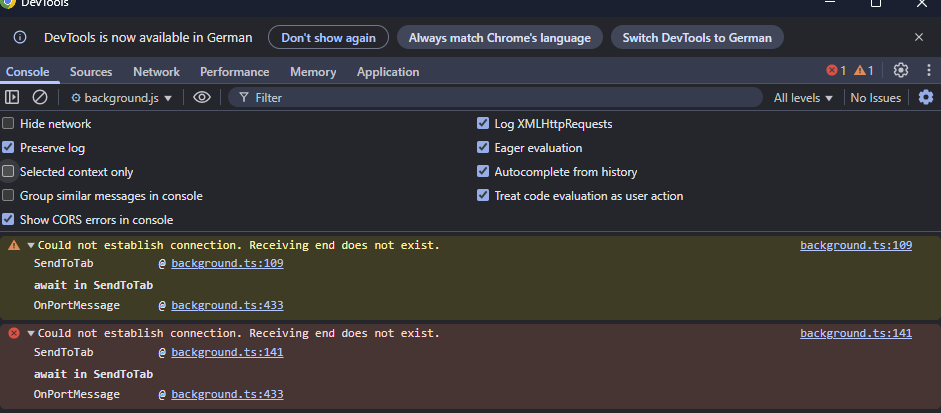
The Chrome Service Worker console shows every time I open the selector in NM.GetElement:
”Could not establish connection. Receiving end does not exist” as warning and as error: -
The process OpenRPA.NativeMessagingHost.exe runs correctly in the background and responds when launched manually.
-
The Chrome manifest is correct: MessagingHost path and extention id are correct.
-
The registry entry exists under HKCU\Software\Google\Chrome\NativeMessagingHosts\com.openrpa.msg
(nothing under HKLM, which seems normal for a per-user installation).
What I’ve tried
-
Restarted OpenRPA, Chrome, Edge, and Firefox (Per taskkill /F).
-
Reinstalled the Chrome extension and OpenRPA (both “for all users” and “per user”).
-
Deleted and recreated the OpenRPA settings.json.
-
Verified that the Named Pipes are created:
2_openrpa_nativebridge_chrome
2_openrpa_nativebridge_chrome_1 -
Disabled all other extensions and ensured full permissions are granted.
-
Tested with different Chrome profiles.
-
No antivirus or policies are blocking communication (Windows Defender checked).
-
Running everything in the same user session.
-
NativeMessagingHost returns valid “ping” responses when called manually.
Additional observation
-
The green overlay used by the selector is broken — instead of highlighting the selected element, it only shows a small green cube in the top-left corner of the screen.
-
The selector cannot highlight or pick elements on any page.
-
The error occurs even on simple pages like example.com.
-
This might indicate a coordinate or window handle issue, but even with 100% scaling and a single monitor setup, the same problem persists.
Current status
-
Native messaging seems to initialize correctly, but OpenRPA never receives a response from the browser side (“receiving end does not exist”).
-
The issue reappears even after full reinstall and affects all browsers.
-
It looks like the OpenRPA client fails to attach the active Chrome tab, even though the bridge process and pipes are alive.
Question
Has anyone seen this recently or knows what could cause the extension connection to suddenly stop working, even though all manifests, registry entries, and pipes are correct?
Could this be related to a Chrome update or something breaking the Native Messaging handshake?
Any guidance would be appreciated. I can share full debug logs if helpful.